
There are some little workplace abbreviations that seem to appear overnight, then suddenly everybody is using them as if they were born knowing them. WFH is one of those three-letter expressions.
You might spot it in a Slack message, on a job listing, in an office calendar, or in a text from a coworker saying, “WFH today, catch you tomorrow.” And if you’ve ever wondered, wait, what does WFH mean exactly?, you’re very much not alone.
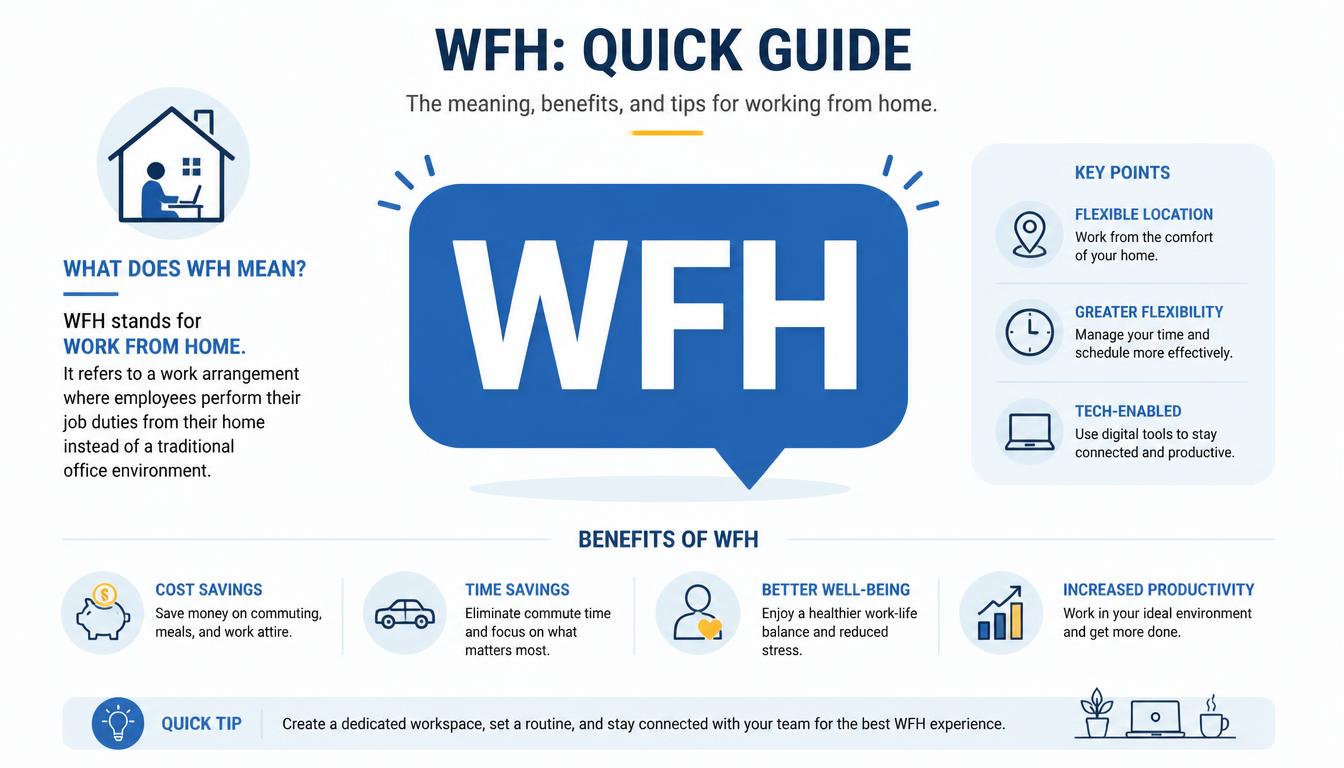
At its simplest, WFH means “Work From Home” or “Working From Home.” It describes an arrangement where an employee performs their job from their home, apartment, house, or another personal workspace instead of travelling into the company’s physical office.
Sounds simple enough, but the little abbreviation carries a surprisingly big suitcase of ideas with it: remote work, flexibility, commuting, productivity, communication, and sometimes the strange experience of attending a serious meeting while your laundry quietly judges you from the corner.
The phrase has become part of everyday workplace language, but its meaning can shift slightly depending on the company. For one worker, WFH might mean working remotely every day.
For another hybrid worker, it could mean staying home two days a week and going into the office for the other three. So, let’s unpack the whole thing properly, without making it sound like a corporate handbook that forgot humans exist.
What Does WFH Mean in Simple Words?
So, what does WFH mean in plain English? It means doing your job from home rather than from your employer’s usual office location. The WFH abbreviation is short for Work From Home, while working from home describes the actual activity.
Imagine Sara normally works at a company office. Every morning she catches the bus, reaches her desk, opens her laptop, and begins answering emails.
On Wednesday, however, her company allows her to work from her home office. She logs in from her kitchen-side desk, joins online meetings, answers messages and finishes her projects there. Sara is WFH that day, easy peasy.
You may also see WFH acronym used in conversations such as “Are you WFH tomorrow?” or “I’m WFH until Friday.” In a job advertisement, the same idea can appear in more formal language such as work from home, remote working, flexible work, or remote work arrangement. The wording changes, but the basic idea stays pretty much the same.
Common ways people use WFH include:
- “I’m WFH today, so message me on Slack.”
- “Our team has two WFH days each week.”
- “Is this position WFH or office-based?”
- “I’ll be WFH while the office is being renovated.”
- “My company offers a flexible WFH policy.”
- “She took a WFH job after moving to another city.”
- “We have a hybrid schedule with three office days and two WFH days.”
It can feel like office language has turned into alphabet soup sometimes, but once you know the core meaning, WFH stands for Work From Home and thats really the heart of it.
What Does WFH Mean at Work?
When someone asks what does WFH mean at work, the answer can involve more than simply sitting at home with a laptop. In a professional setting, WFH usually refers to an agreed work location or working arrangement. The employer may have rules about working hours, availability, equipment, meetings, data security, and communication.
For example, a remote employee may be expected to remain available during normal business hours, even though they aren’t physically present at the office.
They might use Slack for instant messaging, email for formal communication, and video conferencing tools for meetings. A home-based worker can therefore be just as connected to the workplace as somebody sitting three desks away from their manager.
That distinction matters because WFH doesn’t mean “I’m off today.” This is one of the funniest little misunderstandings people can have when first encountering the term. WFH days are still working days. The office chair has simply been replaced by a chair at home, hopefully one that doesn’t squeak every time you breathe.
A typical WFH arrangement might include:
- A company laptop or desktop computer.
- A reliable internet connection.
- A designated workspace or home office.
- Access to company files and software.
- Instant messaging and collaboration platforms.
- Regular online meetings.
- Clearly defined working hours.
- A work-from-home policy explaining expectations.
In other words, WFH is not a holiday wearing a business shirt. It is still employment, deadlines and responsibility, just with a different geographical location.
WFH vs Remote Work: Are They Actually the Same?
People often use WFH and remote work as though they’re identical, and in everyday conversation thats usually fine. But there can be a small distinction.
Work from home specifically points toward working from your home or place of residence. Remote work is a broader term describing work performed outside the traditional office. A remote employee might work from home, a coworking space, a library, or another approved location.
Think of WFH as one room inside the larger house called remote work.
Someone with a fully remote work arrangement may never be required to visit a physical office. Someone with a WFH policy might only work from home on particular days.
That’s why it is useful to read the employer’s actual policy instead of assuming every “remote” or “WFH” label means the same thing.
The difference can look like this:
- WFH: Working specifically from home.
- Remote work: Working outside the traditional office, potentially from various locations.
- Fully remote: The job is designed to be performed remotely on an ongoing basis.
- Hybrid work: Employees split their time between home and the office.
- In-office work: Employees are generally expected to work from the physical workplace.
This little distinction becomes important when applying for WFH jobs. A listing saying “remote” might have different expectations from a listing saying “two WFH days per week,” so always check the details before planning your new desk-and-coffee lifestyle.
WFH vs Hybrid Work: What’s the Difference?
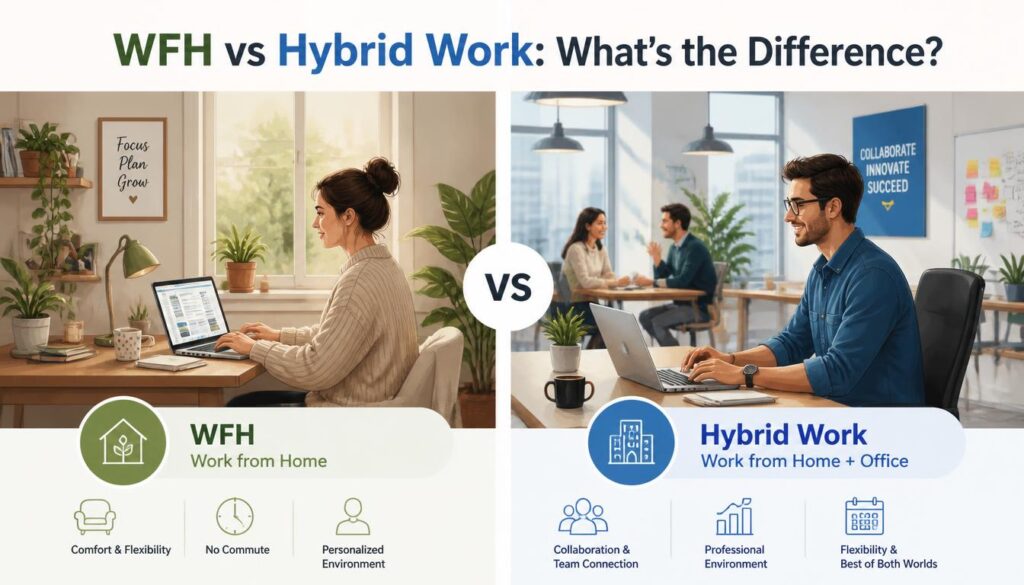
Here is where workplace terminology gets a bit tangled. Hybrid work combines remote working with in-office work, while WFH refers to working from home. A hybrid employee may therefore have WFH days as part of their overall schedule.
Suppose Ahmed works Monday, Tuesday and Thursday at the office, then Wednesday and Friday at home. Ahmed is a hybrid worker, and Wednesday and Friday are his WFH days. His employment model isn’t fully remote because the office remains part of his regular working routine.
This kind of hybrid work schedule has become common in many workplaces. The exact pattern varies wildly, though. One company might allow two WFH days, another might require three office days, and another could let employees choose according to their team’s needs.
There isn’t one magical formula that works for everybody, which is probably why companies keep having meetings about meetings about it.
Owl Labs’ 2024 State of Hybrid Work report found that 27% of surveyed U.S. workers were working in a hybrid format and 11% were fully remote. The report also found that three office days per week was the most common arrangement among hybrid workers, although preferred schedules did not always match actual schedules. OOwl Labs
So if somebody says, “I WFH twice a week,” that doesn’t necessarily mean they are a fully remote worker. They may simply be part of a flexible work arrangement within a hybrid workplace.
Why Do People Like Working From Home?
For many employees, the attraction of working from home begins with something very ordinary: the commute disappears.
No traffic jam. No crowded bus. No frantic search for parking. No leaving the house while it is still dark because your first meeting starts at eight.
There is something almost luxurious about walking five steps to your desk instead of driving five miles, even if those five steps involve avoiding a sleepy cat.
One obvious advantage is time savings. The time once spent travelling can potentially be used for breakfast, exercise, family, rest, or simply staring out the window for five peaceful minutes.
Common benefits of WFH can include:
- Reduced commuting and transportation costs.
- Greater workplace flexibility.
- More control over the daily work environment.
- Potential improvements in work-life balance.
- A quieter or more focused environment for certain tasks.
- Greater convenience for people with long commutes.
- More flexibility around personal routines.
Owl Labs reported in its 2024 research that 74% of respondents believed they would be more productive without a commute, while hybrid workers reported spending substantially more on office days than remote days. OOwl Labs
Still, WFH isn’t automatically paradise. Your home can become your office, your dining table can become a meeting room, and somehow the kitchen starts calling your name precisely when you’re trying to finish an important report. Flexibility works best when boundaries exist.
The Technology That Makes WFH Possible
Modern remote working would be much harder without the digital tools that connect people across geographical distance. A worker in Lahore can collaborate with a coworker in London, another teammate in Dubai and a manager somewhere else, all without anyone boarding a plane.
Slack, for example, can support instant messaging, team channels and quick workplace conversations. Video conferencing platforms allow teams to hold virtual meetings, while shared documents and project-management systems help people collaborate on the same work from different locations.
Some of the technology commonly involved in WFH includes:
- Video conferencing tools for meetings and presentations.
- Slack and other messaging platforms for quick communication.
- Cloud-based documents for collaborative editing.
- Project-management tools for tracking tasks.
- Email for formal or detailed communication.
- Shared calendars for scheduling.
- Secure company systems for accessing workplace information.
Owl Labs also develops collaborative technology for hybrid workplaces, including the Meeting Owl 4+, a 360-degree camera, microphone and speaker system designed to make meetings involving remote and in-room participants more inclusive. Owl Labs
Technology solves a lot, but it doesn’t solve everything. A fast internet connection cannot magically teach a team how to communicate clearly, and no video call can completely replace thoughtful management. Sometimes the best remote communication tool is still a simple sentence that says, “I need help with this.”
How Does a WFH Policy Usually Work?
A WFH policy is essentially the company’s rulebook for working from home. It may explain who is eligible, how often employees can work remotely, which hours they must be available and what equipment the company provides.
A good remote work policy should ideally remove guesswork. Employees shouldn’t have to decode mysterious calendar invitations just to figure out whether tomorrow is an office day.
A policy might cover:
- Which employees are eligible for WFH.
- Approved WFH days.
- Required office days.
- Working hours and availability.
- Expectations for meetings.
- Cybersecurity and data protection.
- Company equipment.
- Internet or home-office allowances.
- Rules for changing a scheduled work location.
- Performance and communication expectations.
Policies vary greatly by employer, industry and country. Some businesses have fully flexible arrangements, while others allow remote work only in particular circumstances.
That is why “Do you offer WFH?” can be a better question than assuming a job is remote. The answer may be “yes, two days a week,” “yes, with manager approval,” or “yes, but only after probation.” Tiny details can make a rather large difference.
WFH Communication: Keeping Coworkers Close
One of the hidden challenges of WFH is that casual communication doesn’t happen naturally. In an office, you might turn around and ask a coworker a question. At home, that coworker could be 500 miles away, blissfully unaware that you are wrestling with a spreadsheet.
This makes coworker communication especially important.
Good remote communication is usually clear, timely and respectful of people’s attention. A message like “Hey, whenever you have time, could you check this?” gives someone context without creating unnecessary panic. A message saying “URGENT!!!” for something that can wait until tomorrow is less charming.
Useful habits include:
- Keep your Slack messages clear and reasonably brief.
- Use text messaging only when appropriate for your workplace.
- Explain deadlines instead of simply saying something is urgent.
- Use video calls when conversation would be easier than typing.
- Keep coworkers updated when a task changes.
- Respect colleagues’ working hours and time zones.
- Ask before assuming someone is instantly available.
The aim isn’t to communicate constantly. It’s to communicate well. That’s a surprisingly big difference, and remote teams learn it sooner or later.
Read more:https://ytmeaning.com/redacted-meaning/
How WFH Can Affect Productivity
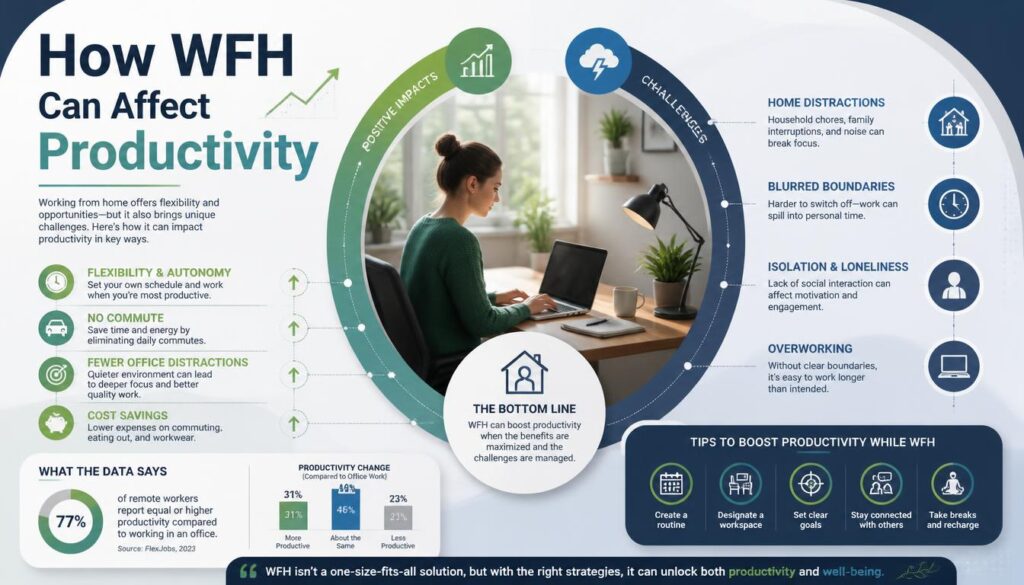
People sometimes imagine productivity as a simple equation: home equals distractions, office equals focus. Real life laughs at that equation.
For some people, a focused environment at home makes it easier to complete demanding work. There are fewer spontaneous interruptions, less commuting fatigue and more control over the surroundings.
For others, home contains a thousand distractions, from family conversations to dishes that suddenly become fascinating during deadline week.
Productivity depends on the person, the job and the work environment.
A software developer may need long uninterrupted periods for deep work. A sales employee may spend much of the day in calls. A manager may need frequent conversations with a team. A parent may value flexibility around school schedules. None of these experiences fit neatly into one “WFH is good” or “WFH is bad” box.
The practical question is less “Where should everybody work?” and more “Where can this particular work be done effectively, and what support does the worker need?” That’s a much less catchy sentence, but probably a wiser one.
Creating a Better Home Office
A home office doesn’t need to look like something from a glossy magazine. You don’t need a giant desk, three monitors and a plant named Gerald to be productive.
A comfortable chair, dependable internet, sensible lighting and a reasonably quiet designated workspace can be enough. If possible, separating work equipment from personal areas can also help your brain understand when the working day has started and when it has finished.
Small improvements can make WFH feel less chaotic:
- Keep your desk reasonably uncluttered.
- Use headphones when background noise is unavoidable.
- Put your work laptop somewhere you can close it at the end of the day.
- Keep a charger nearby so technology doesn’t betray you at 3%.
- Use a calendar to protect focused work time.
- Take proper breaks instead of becoming permanently attached to the chair.
And if your home office is actually half a dining table, that’s okay too. WFH is supposed to serve real people, not interior-design photographs.
The Environmental Side of WFH
There can also be environmental benefits when people work from home, particularly when WFH reduces commuting. Fewer daily journeys can mean less fuel consumption and potentially fewer transport-related emissions.
But the environmental picture isn’t perfectly simple. Heating, cooling and electricity use at home also require resources. If hundreds of employees stop commuting but each heats an entire house all day, the outcome becomes more complicated than “remote work automatically saves the planet.”
Still, reducing unnecessary travel can be meaningful, especially for workers who previously spent long hours commuting. It is another reason sustainable work and workplace flexibility often appear in the same conversation.
The important thing is not to treat WFH as a magic environmental button. It’s one piece of a much larger puzzle.
What Are WFH Jobs?
WFH jobs are roles that can be performed from home, either fully or for certain days each week. Common examples may include software development, writing, design, customer support, bookkeeping, marketing, consulting, sales, administrative work and various digital services.
However, not every job can be done remotely. A nurse, construction worker, restaurant chef or laboratory technician usually needs to be physically present to perform essential duties. So WFH availability depends heavily on the nature of the work.
When searching for work-from-home jobs, look beyond the label. Check whether the role is:
- Fully remote.
- Hybrid.
- Remote within a particular country.
- Remote within specific geographical locations.
- WFH only on selected days.
- Flexible but subject to manager approval.
Also check the company’s work-from-home policy before accepting an offer. “Remote” written in enormous letters at the top of a job ad can sometimes become “three mandatory office days” in the tiny details underneath, which is not exactly the plot twist anyone wants.
WFH Doesn’t Mean Working Alone
One of the most useful things to understand about WFH is that physical distance doesn’t have to mean social distance.
A good remote workplace can still have friendship, humor, mentorship and collaboration. Coworkers may share jokes in Slack, celebrate birthdays through video calls, have virtual coffee chats, or simply send a message saying, “You surviving Monday?”
Managers also have an important role here. Remote workers need feedback, recognition and opportunities to grow just as much as people in the office. A person shouldn’t become invisible merely because their desk happens to be in another room, or another city.
The best collaborative technology supports relationships rather than replacing them. A video meeting should help people connect, not become another rectangle everyone silently stares at for 47 minutes.
A Few Common WFH Phrases You May See
Once you’ve learned the basic WFH meaning, workplace messages start looking much less mysterious.
Here are a few common expressions:
- WFH today The person is working from home today.
- WFH tomorrow They plan to work from home the next day.
- WFH days Days when an employee works from home.
- WFH schedule The agreed pattern for home-based work.
- Remote employee Someone whose job is performed remotely.
- Hybrid employee Someone who splits work between remote and office locations.
- Remote work policy Company rules covering remote work.
- Flexible workplace A workplace offering flexibility in where or sometimes when employees work.
- Office days Days when employees are expected to work from the physical office.
- Work remotely To perform work away from the traditional office.
Once you know these, a message such as “I’m WFH Monday and Thursday, office Tues-Wed-Fri” stops looking like a secret code and starts looking like a perfectly normal calendar arrangement.
How to Talk About WFH Professionally
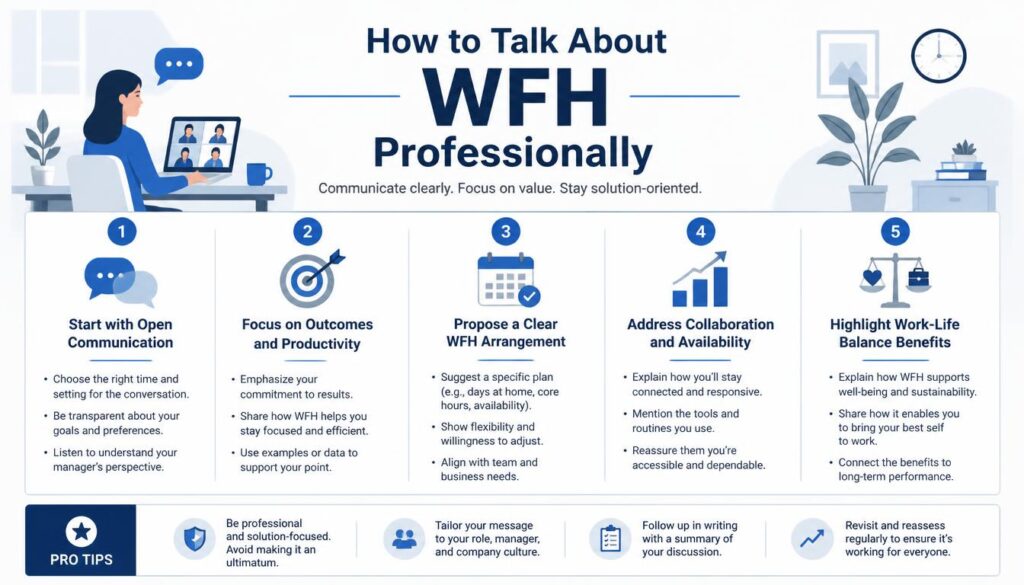
If you’re new to workplace abbreviations, you don’t have to use WFH in every sentence just because everyone else does. Sometimes the full phrase sounds more polished.
For example, you could say:
- “I’ll be working from home tomorrow.”
- “Our team follows a hybrid work schedule.”
- “I’m available online during normal working hours.”
- “I’ll be remote today but reachable on Slack.”
- “Could we discuss the company’s remote work policy?”
- “How many days per week can employees work from home?”
- “Is this position fully remote or hybrid?”
There is no prize for squeezing the acronym into every possible sentence. Language should make communication easier, not turn it into a competition for who can sound most corporate.
Frequently Asked questions
wfh meaning
WFH means “Work From Home.” It refers to working from your home instead of going to a company office or workplace.
wfh meaning in text
In a text message, WFH means “Work From Home.” People commonly use it to tell coworkers or others that they are working remotely from home.
what is wfh mean
WFH means working from home rather than working in an office. It is commonly used to describe a remote or flexible work arrangement.
what does wfh mean in text
When someone writes WFH in a text, they usually mean they are working from home that day. For example, “I’m WFH today” means “I’m working from home today.”
what does wfh mean
WFH stands for “Work From Home” or “Working From Home.” It is a common abbreviation used in workplaces, messaging apps, and everyday conversations.
The Bottom Line: What Does WFH Mean?
So, what does WFH mean after all this? Simply put, WFH stands for Work From Home, and it describes working from your home instead of the traditional office. It is closely connected with remote work, remote working, hybrid work, flexible schedules and modern digital workplaces.
But WFH is more than three letters. For one employee, it might mean saving two hours of commuting every day. For another, it could mean greater flexibility around family life.
For an employer, it may mean redesigning communication, management and workplace policies. And for a coworker, it might simply mean that the person they need is currently answering messages from a desk beside their bedroom window.
The most important thing is to understand the arrangement rather than relying on the abbreviation alone. Ask about WFH days, office requirements, working hours, equipment, communication expectations and the company’s remote work policy.
As workplace culture continues to evolve, WFH will likely remain part of everyday professional vocabulary. The abbreviation is tiny, but the idea behind it has changed how millions of people think about where work happens. And perhaps thats the nicest thing about it: work no longer has to be tied quite so tightly to one particular building.
A good WFH arrangement should give people room to do excellent work while still leaving some room to actually live their lives. The laptop can close, the meeting can end, and the worker can once again become a person who has absolutely no intention of answering one more “quick question” at 9:47 p.m.
If you’ve used WFH yourself, or your company has an unusual hybrid work arrangement, share your experience. Your favorite WFH habit, strangest remote meeting story, or best tip for staying productive might be exactly what another new remote worker needs to hear.